GBros
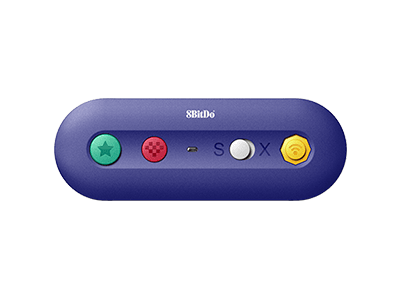
Play your Switch with your original wired controllers like Gamecube, NES, SNES, SFC Classic
Firmware: v2.28
Firmware Updater:
Features
- Switch: HOME button and Screenshot button are available.
- Windows: Turbo functionality is available.
- Virtually lag-free
Compatibility
- Switch (3.0.0 and above)
- Switch 2 (20.1.1 and above)
- Windows
In the Box
- GBros. Adapter
- Cable band
- USB cable
- Instruction manual
- 1. requires batteries sold separately
Downloads
FAQ
What controllers is it compatible with?
It works with Nintendo GameCube controller, NES Classic controller, SNES Classic controller and most controllers with GC port or NES/SNES Classic port.
Can I use it with GameCube Wavebird controller?
No, you can not. The reason is simply because the physical shape of Wavebird controller port does not fit in either of the ports on GBros. However, you can use an extension cable to connect them to each other, as they are compatible with each other technologically.
Can I connect two controllers to it at the same time as there are two controller ports?
No, you can not. It can only take one controller at a time.
Will any controller be recognized as GameCube controller when it is connected to Switch via GBros. And How can I use the GameCube controller button mapping when playing Super Smash Bros. Ultimate on Switch?
No, it will be recognized as Switch Pro controller by default. Just press and hold L+R+A+B+START to swap the button mapping between GameCube mapping and Switch Pro mapping when playing Super Smash Bros. Ultimate. Green LED indicates GameCube mapping. Red LED indicates Switch Pro mapping.
When NES/SNES Classic controller is connected to GBros., does the Dpad on the controller function as a joystick or a Dpad as it is?
It functions as Dpad as it is.
Does it support Screenshot, Home, Turbo, NFC functions when connected to Switch? Can I also use my controller to wake up Switch wirelessly via GBros.?
The functions this adapter supports when connected to Switch include: A. Screenshot = STAR button B. Home button = Logo button Turbo and NFC are not applicable here. You can not wake up your Switch wirelessly via GBros. Nonetheless, when it is connected to Windows 10, it supports Turbo function. STAR button = Turbo button
What is the Micro USB port on GBros. for? Can I used it wired?
The USB port here is for firmware upgrade. You can also connect it to Switch and Windows 10 via a USB cable and use it as a wired adapter. When it is connected to devices via USB, batteries are not needed.
What is the battery consumption like?
New batteries can last for approximately 30 hours. Nonetheless, it really depends the battery capacity and quality.
How many GBros. can I connect to my Switch at a time? Can I use it on hand held mode as well as docked mode?
You can connect multiple GBros. to your Switch at a time. Switch will see the controllers as Switch Pro controllers. It works on both hand held and docked modes.