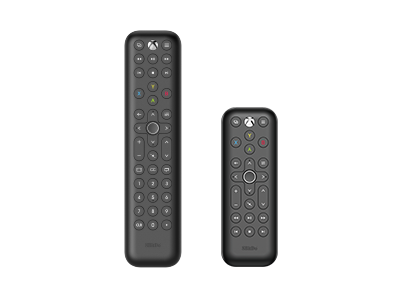
Media Remote for Xbox
Compatible with Xbox Series X, Xbox Series S and Xbox One.
Compatibility
- Xbox Series X
- Xbox Series S
- Xbox One
In the Box
- 8BitDo Media Remote for Xbox (Long edition) & (Short edition)
- AAA *2
- Manual
Tech Specs
| Dimensions | 134.25x48x18.8 mm |
|---|
Downloads
FAQ
What systems does it work with?
It works with Xbox Series X, Xbox Series S, and Xbox One.
What is the difference between Short edition and Long edition?
The long edition is a full version remote with numeral buttons, navigation, media control, and Xbox button. The short edition is a simple version without numeral buttons.
Does 8BitDo Media Remote support Fly Mouse?
No, it doesn’t. This infrared remote can control Up, Down, Left, and Right movement at a constant speed.
What can I do if the control is not sensitive?
Please aim directly at your Xbox and ensure there is no obstruction between 8BitDo media remote and the console when using. Use within 8 meters directly in front of Xbox console, the strong light may shorten it. When the backlight stops lighting up, please change the battery. Don’t mix old and new batteries.
How to open the back cover?
Please slide the battery compartment cover upward to open it.
Why volume control doesn’t work?
To control your TV and other media devices’ volume through the Xbox console, please ensure that your device supports HDMI-CEC and this function is enabled. You can consult your device manufacturer for more details.
What functions can be achieved through HDMI-CEC by controlling Xbox console with 8BitDo Media Remote?
Once CEC is enabled on your TV or AVR, you can control individual CEC settings on the console’s TV & A / V power options settings screen. Console turns on / off other devices: Turning on / off your Xbox console will also turn on / off your TV or AVR. Console sends volume commands: The console can control the volume on your TV, AVR, or soundbar.
Why some buttons don’t work?
Certain features are available only in certain countries and regions.
How do I turn off the remote? Why the backlit keeps blinking sometimes?
The backlit turns off after 5 seconds of no operation. When the backlit keeps blinking or stops lighting up, please change the battery.
How to sync the media remote to the Xbox console?
8BitDo Media Remote will control your Xbox console via Infrared when in range, no pairing needed.